


Free Shopify customer reviews section
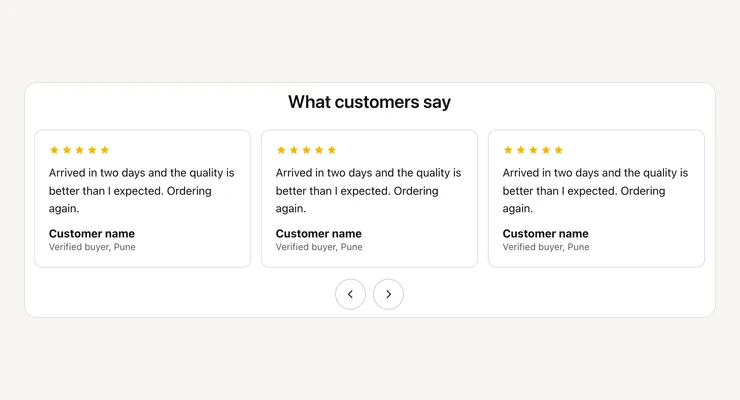
Real customer words with star ratings, names and photos, in a row that swipes on phones and moves with arrow buttons on computers.
- Price
- Free, no monthly fee
- Works on
- Any page
- In the theme editor
- Pixel Caption Reviews
- Made by
- The Pixel Caption growth team
The problem it solves
Shoppers trust other buyers more than a brand’s own copy. A product page with no customer voice leaves a first-time buyer guessing whether the fabric, the fit or the taste lives up to the photos.
Review apps can be heavy, cost a monthly fee and show widgets that don’t match your theme. If you already have kind words from WhatsApp chats or emails, you can show them with the customer’s permission.
What it does
Real customer words with stars and photos, in a row that swipes on phones and computers.
Up to 12 reviews
Add one Review block per review: what they said, their name, a small line such as their city, and a photo if you have one. Drag the blocks into any order.
Stars you set
Set 0 to 5 stars on each review, where 0 hides them. Screen readers hear the rating as a number out of 5. Pick the star colour to suit your brand.
Swipes on phones
The reviews sit in one row that shoppers swipe on phones, three to a view on wide screens. Arrow buttons move the row along when there’s more than one review.
Only real reviews
The section shows only what you type in, so use real customer words with their permission. Add a heading and a small line above the row, and set the space around it.
Settings in the theme editor
Every setting below is in the section’s code, pixelcaption-testimonials.liquid. Change any of them in Customize, with no code.
| Setting | Type | Default |
|---|---|---|
| Heading | Text | What customers say |
| Small line (optional) | Text | Empty |
| Star colour | Colour | #f5b800 |
| Space above | Slider, 0 to 100 px | 40 px |
| Space below | Slider, 0 to 100 px | 40 px |
| Setting | Type | Default |
|---|---|---|
| What they said | Text box | A sample review, to replace |
| Name | Text | Customer name |
| Small line (optional) | Text | A sample line, to replace |
| Stars (0 hides them) | Slider, 0 to 5 | 5 |
| Photo (optional) | Image | Empty |
How to install
About five minutes in your Shopify admin, with no coding. These are the same steps as the guide in the .zip.
Download the .zip
Tap Download below. The .zip holds the section file, sections/pixelcaption-testimonials.liquid, and an install guide with a button that copies the code.
Make a backup copy
In Shopify admin go to Online Store, then Themes. Click the three dots next to your live theme and choose Duplicate, so you can publish the copy if anything goes wrong.
Create the section file
Click the three dots again and choose Edit code. Under the Sections folder click “Add a new section”, name it pixelcaption-testimonials and pick Liquid if Shopify asks.
Paste the code
Select everything in the new file and delete it. Paste the code from the section file in the .zip, then click Save.
Add it to your page
Back in Themes, click Customize and open any page. Click “Add section”, pick Pixel Caption Reviews and click Save.
Set it up
Add one Review block per review: what they said, their name, a small line like their city, and stars.
Good to know
- Use only real reviews, with the customer’s permission.
Related components
Other free sections that work well next to this one.
Get the customer reviews
One short form and the .zip is yours, with install notes. It comes by email too.
Customer reviews
- The section file and install notes
- Works in your theme editor, no app
- No monthly fee