


Free Shopify announcement ticker section
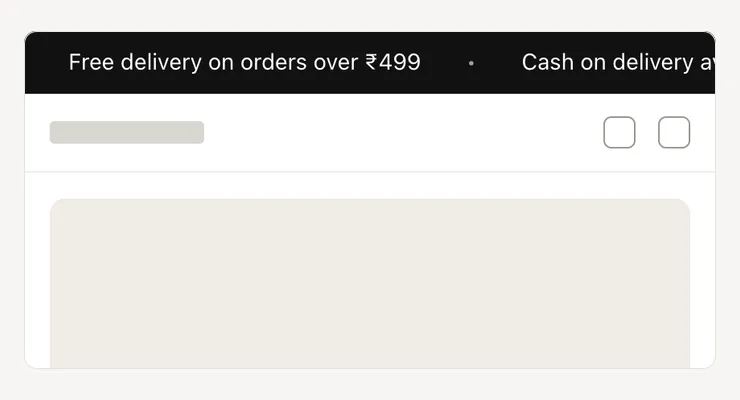
A slim band of short messages that scrolls across the page, for offers, delivery news or launches. It stands still for shoppers who turn off motion.
- Price
- Free, no monthly fee
- Works on
- Any page, usually the top
- In the theme editor
- Pixel Caption Ticker
- Made by
- The Pixel Caption growth team
The problem it solves
A standard announcement bar shows one message at a time, so you choose between the sale, free delivery and COD. The other offers stay hidden, though each one could be the reason someone buys today.
Bars that swap messages every few seconds are hard to read and easy to miss on a phone. A slow, steady band lets every message pass in front of the shopper without them waiting or tapping.
What it does
A slim band of short messages that scrolls across the top. Stands still if motion is off.
Up to 10 messages
Add one Message block per message, up to 10, with an optional link on any of them. Three to five short messages read best, and you drag them into order.
Speed and direction
Set how long one full loop takes, from 10 to 60 seconds, and whether the band moves right to left or left to right. A dot, a star or nothing sits between messages.
Pauses under the mouse
On computers the band can pause while the mouse is over it, so a shopper can read or click a message. The text size and the band’s colours are yours to set.
Respects reduced motion
Shoppers who turn off motion see the messages standing still, centred and wrapped onto lines. Screen readers hear each message once, though the band shows it twice.
Settings in the theme editor
Every setting below is in the section’s code, pixelcaption-announcement-ticker.liquid. Change any of them in Customize, with no code.
| Setting | Type | Default |
|---|---|---|
| Time for one full loop | Slider, 10 to 60 s | 30 s |
| Direction | Choice | Right to left |
| Between messages | Choice | Dot |
| Pause when the mouse is over it | Tick box | On |
| Text size | Slider, 11 to 20 px | 14 px |
| Background | Colour | #121212 |
| Text | Colour | #ffffff |
| Setting | Type | Default |
|---|---|---|
| Message | Text | Free delivery on orders over ₹499 |
| Link (optional) | Link | Empty |
How to install
About five minutes in your Shopify admin, with no coding. These are the same steps as the guide in the .zip.
Download the .zip
Tap Download below. The .zip holds the section file, sections/pixelcaption-announcement-ticker.liquid, and an install guide with a button that copies the code.
Make a backup copy
In Shopify admin go to Online Store, then Themes. Click the three dots next to your live theme and choose Duplicate, so you can publish the copy if anything goes wrong.
Create the section file
Click the three dots again and choose Edit code. Under the Sections folder click “Add a new section”, name it pixelcaption-announcement-ticker and pick Liquid if Shopify asks.
Paste the code
Select everything in the new file and delete it. Paste the code from the section file in the .zip, then click Save.
Add it to your page
Back in Themes, click Customize and open any page, usually the top. Click “Add section”, pick Pixel Caption Ticker and click Save.
Set it up
Add one Message block per message. Add a link if you want it clickable. Set the speed: a higher number is slower.
Good to know
- Three to five short messages read best.
Related components
Other free sections that work well next to this one.
Get the announcement ticker
One short form and the .zip is yours, with install notes. It comes by email too.
Announcement ticker
- The section file and install notes
- Works in your theme editor, no app
- No monthly fee