


Free Shopify countdown timer section
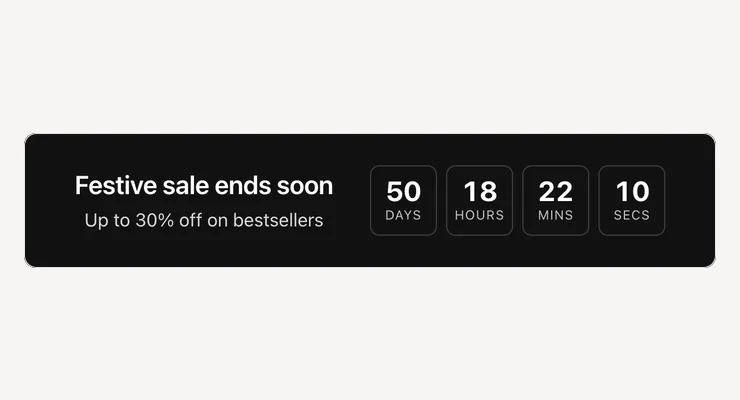
Counts down to the real end of your sale, the same for every shopper, then hides itself or shows a message when the time is up.
- Price
- Free, no monthly fee
- Works on
- Any page
- In the theme editor
- Pixel Caption Countdown
- Made by
- The Pixel Caption growth team
The problem it solves
A sale with a deadline sells more when shoppers can see it. A line like “ends Sunday” is easy to forget, while days, hours and minutes counting down remind them each time they visit.
Many timer apps restart the clock for every visitor, so the “last few hours” never end. Shoppers notice, and it misleads them. A timer is worth showing only when it counts to a real time, the same for everyone.
What it does
Counts down to the real end of your sale, the same for every shopper, then hides itself.
Counts to a real time
Type the end date, like 2026-12-31, and a time on the 24-hour clock, like 23:59. Every shopper sees the same days, hours, minutes and seconds left.
Your time zone
The time is read as India time (IST) by default. You can also pick UAE, Saudi Arabia, UK, Central Europe, Singapore, Sydney, US East or US West.
Ends cleanly
When the clock reaches zero, the section hides itself or shows your message, like “The sale has ended”. It never restarts or moves the deadline for anyone.
Heading, text and button
Add a heading, a line of text and an optional button with its link, like “Shop the sale”. If the date is typed wrong, only you see a note, in the theme editor.
Settings in the theme editor
Every setting below is in the section’s code, pixelcaption-countdown-timer.liquid. Change any of them in Customize, with no code.
| Setting | Type | Default |
|---|---|---|
| Heading | Text | Festive sale ends soon |
| Text | Text | Up to 30% off on bestsellers |
| End date | Text | 2026-12-31 |
| End time | Text | 23:59 |
| Time zone of that time | Choice | India (IST) |
| When it ends | Choice | Hide the section |
| Message after it ends | Text | The sale has ended. Thank you for shopping with us. |
| Button text (optional) | Text | Shop the sale |
| Button link | Link | Empty |
| Labels: days, hours, minutes, seconds | Text | Days, Hours, Mins, Secs |
| Background | Colour | #121212 |
| Text | Colour | #ffffff |
| Button colour | Colour | #ffe440 |
| Button text colour | Colour | #121212 |
| Space above | Slider, 0 to 80 px | 28 px |
| Space below | Slider, 0 to 80 px | 28 px |
How to install
About five minutes in your Shopify admin, with no coding. These are the same steps as the guide in the .zip.
Download the .zip
Tap Download below. The .zip holds the section file, sections/pixelcaption-countdown-timer.liquid, and an install guide with a button that copies the code.
Make a backup copy
In Shopify admin go to Online Store, then Themes. Click the three dots next to your live theme and choose Duplicate, so you can publish the copy if anything goes wrong.
Create the section file
Click the three dots again and choose Edit code. Under the Sections folder click “Add a new section”, name it pixelcaption-countdown-timer and pick Liquid if Shopify asks.
Paste the code
Select everything in the new file and delete it. Paste the code from the section file in the .zip, then click Save.
Add it to your page
Back in Themes, click Customize and open any page. Click “Add section”, pick Pixel Caption Countdown and click Save.
Set it up
Type the end date like 2026-12-31 and the time like 23:59. Pick the time zone that time is in (India is the default). Choose what happens at the end: hide the section or show a message.
Good to know
- Use the real end of the sale. A timer that restarts for every visitor misleads shoppers.
Related components
Other free sections that work well next to this one.
Get the countdown timer
One short form and the .zip is yours, with install notes. It comes by email too.
Countdown timer
- The section file and install notes
- Works in your theme editor, no app
- No monthly fee